
Introduction
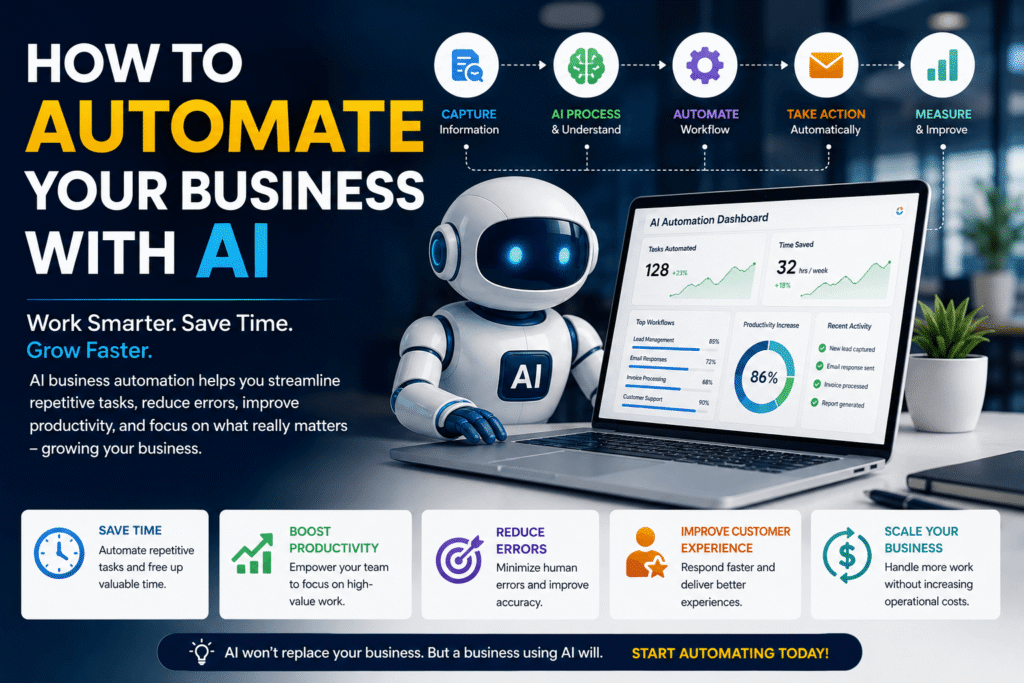
What if your business could complete hours of repetitive work every week—without hiring another employee?
Emails, customer questions, data entry, scheduling, reports, marketing tasks, and follow-ups can quietly consume a huge amount of your team’s time. That is exactly where AI business automation can make a difference.
AI is moving beyond simple chatbots and content generation. Businesses are increasingly using AI agents and automated workflows to handle parts of real business processes. Microsoft’s 2025 Work Trend Index reported that 46% of leaders said their organizations were using agents to fully automate workstreams or business processes.
The opportunity is not to automate everything.
Instead, the goal is to automate the right things.
In this guide, you’ll learn what AI business automation means, which tasks are worth automating, how to build your first AI workflow, what mistakes to avoid, and how to measure whether automation is actually improving your business. If you’re a small business owner, learn more about how AI for small business can reduce repetitive work and improve productivity.
> Key Takeaway: The best AI automation strategy starts with a business problem—not with buying the newest AI tool.
Table of Contents
1. What Is AI Business Automation?
2. Why AI Automation Matters for Modern Businesses
3. What Business Tasks Can AI Automate?
4. AI Business Automation Examples
5. AI Automation vs Traditional Automation
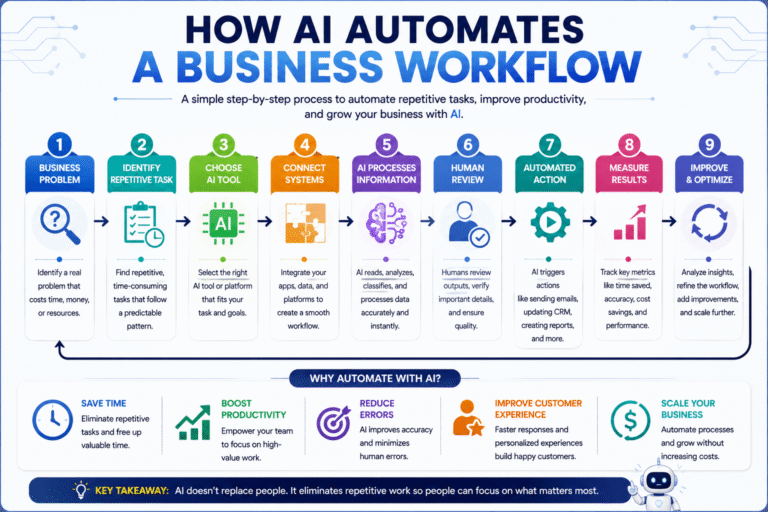
6. How to Automate Your Business with AI
7. Benefits of AI Business Automation
8. Common AI Automation Mistakes
9. Practical AI Automation Checklist
10. Internal and External Link Opportunities
11. CTA: Start Automating Your Business
12. Frequently Asked Questions
13. Conclusion
What Is AI Business Automation?
AI business automation is the use of artificial intelligence, software integrations, and automated workflows to perform or assist with repetitive business tasks that previously required manual effort.
Traditional automation generally follows predefined rules. AI automation can add capabilities such as understanding natural language, classifying information, generating content, summarizing documents, identifying patterns, and making recommendations.
For example, a traditional workflow might send the same confirmation email whenever a form is submitted. An AI-powered workflow could read the customer’s message, identify their request, create a personalized response, and route complicated cases to a human.
AI Automation in Simple Terms
Think of an AI-powered workflow as:
Trigger → AI understands → AI processes → Action → Human review when needed
For example:
New customer inquiry → AI identifies intent → AI drafts response → CRM updated → Salesperson reviews
That is much more useful than simply asking an AI chatbot to write an email.
Why Does AI Automation Matter for Modern Businesses?
Modern businesses are dealing with more information, communication, and customer expectations than ever.
Employees may spend their days moving information between email, spreadsheets, CRMs, project-management systems, documents, and messaging platforms.
That creates a hidden productivity problem.
Microsoft’s research describes a growing shift toward human-agent teams, where AI agents handle more execution while people focus on direction, decisions, and outcomes.
The real problem is repetitive work
Consider a sales employee who receives 50 inquiries.
They might need to:
- Read every message
- Identify potential customers
- Extract contact information
- Categorize the inquiry
- Update a CRM
- Draft follow-up emails
- Schedule calls
- Notify another team member
AI automation can potentially handle several of those steps.
The employee can then concentrate on conversations that actually require judgment.
> Summary Box
>
> Before: Employee manually moves information between systems.
> After: AI processes routine information automatically.
> Human role: Review, decide, communicate, and handle exceptions.
> Result: Less repetitive work and more time for high-value activities.
What Business Tasks Can AI Automate?
Not every task should be automated. However, businesses have many processes that are excellent candidates for AI.
AI Automation for Customer Service
Customer service is one of the most practical starting points.
AI can help:
- Answer frequently asked questions
- Categorize support requests
- Summarize conversations
- Draft responses
- Detect urgent complaints
- Route tickets to the correct department
- Create support summaries
For instance, an online retailer could automatically classify incoming messages as refund, delivery, product question, or technical issue.
Simple questions could receive automated responses. Complex complaints could immediately reach a human representative.AI can help businesses improve customer service by answering frequently asked questions, categorizing support requests, and routing complex issues.
AI Automation for Marketing
Marketing teams can automate parts of content production and campaign management.
AI can assist with:
- Content ideas
- Social media drafts
- Email personalization
- Customer segmentation
- Content repurposing
- Review analysis
- Campaign summaries
- Lead nurturing
The important distinction is that automation should support marketing strategy rather than replace it.
Humans should still define the brand voice, positioning, audience, and final messaging.
AI Automation for Sales
Sales teams can use AI to reduce administrative work.
A workflow might automatically:
1. Receive a new lead.
2. Extract relevant information.
3. Classify the lead.
4. Add the lead to a CRM.
5. Score the opportunity.
6. Draft a personalized follow-up.
7. Notify the appropriate salesperson.
This allows salespeople to spend less time updating systems and more time talking to prospects.
AI Automation for Administration
Administrative work is another strong candidate.
AI can assist with:
- Meeting summaries
- Document processing
- Email organization
- Report generation
- Data extraction
- Scheduling
- Internal knowledge management
- Invoice information processing
These tasks may look insignificant individually.
Collectively, however, they can consume hours every week.
AI Business Automation Examples
The easiest way to understand AI automation is to see it in action. Before choosing a platform, compare different AI tools based on your business requirements rather than simply choosing the most popular option.
Example 1: Automated Lead Management
Traditional process:
Website form → Employee checks email → Copies information → Opens CRM → Creates lead → Sends follow-up
AI-powered process:
Website form → AI reads inquiry → Classifies lead → CRM updated → Personalized email drafted → Salesperson notified
The second workflow reduces manual steps while keeping a human involved where judgment matters.
Example 2: Automated Customer Support
Imagine a software company receiving hundreds of support messages.
AI could classify each request automatically.
Password problem → Account support
Billing question → Finance
Technical problem → Technical support
Potential complaint → Human representative
The AI does not need to solve every problem. It simply gets the right information to the right person faster.
Example 3: Automated Meeting Follow-Up
After a sales meeting, an AI workflow could:
Meeting ends → Transcript processed → Summary created → Action items extracted → CRM updated → Follow-up draft prepared
A salesperson can then review the information rather than reconstructing the meeting from memory.
Real-World Case Study: Small Business AI Automation
A useful example comes from a small California business, Jackie’s Jams.
The U.S. Chamber of Commerce reported that owner Risa Baron used generative AI for social media advertising and messaging and said it saved at least an hour per day on backend office work.
The lesson is important.
AI automation does not have to begin with an expensive enterprise system.
A small business can start by eliminating a few repetitive tasks.
Business lesson: Saving one hour every working day can create a meaningful productivity gain over a year.
Expert Tip: Don’t automatically choose AI just because it is available. If a simple rule can solve the problem reliably, traditional automation may be the better option.
How to Automate Your Business with AI
Step 1: Identify repetitive business processes
Start by documenting what your business does every week.
Look for tasks that are:
- Repetitive
- Digital
- Time-consuming
- Predictable
- High-volume
- Rules-based
- Easy to measure
Do not start with your most complicated process.
Start with something manageable.
Step 2: Calculate the current cost
Before automating, measure the existing workflow.
For example:
Task: Customer email processing
Current time: 10 minutes per email
Volume: 30 emails per day
Daily workload: 300 minutes
That gives you a baseline.
Without a baseline, it becomes difficult to determine whether automation actually created value.
Step 3: Choose the right AI tool
Your tool should match your workflow. You may need an AI assistant for tasks such as drafting emails, summarizing information, or creating content.
You may need:
- An AI assistant
- A chatbot
- A CRM with AI features
- A workflow automation platform
- An AI document-processing tool
- An AI agent
- An API-based AI system
Avoid purchasing several tools before understanding what your process actually needs.
Step 4: Connect your systems
AI becomes more powerful when it can work with the systems your business already uses.
For example:
Website → CRM → AI → Email → Project Management
The exact tools will depend on your business.
The principle remains the same: reduce unnecessary manual handoffs.
Step 5: Add human oversight
Automation should not mean removing humans from every decision.
Create clear review points.
Human approval is especially important for:
- Financial decisions
- Legal information
- Sensitive customer data
- Employment decisions
- High-value sales
- Public communications
- Important customer complaints
NIST’s AI Risk Management Framework recommends organizations consider trustworthy and responsible AI practices throughout the AI lifecycle.
Step 6: Measure the results
Track measurable outcomes.
Useful metrics include:
- Hours saved
- Cost per task
- Response time
- Error rate
- Customer satisfaction
- Conversion rate
- Revenue generated
- Employee productivity
For example:
Before automation: 8 hours/week
After automation: 3 hours/week
Time recovered: 5 hours/week
That is a measurable business result.
> Key Takeaway: If you cannot measure what an automation workflow improves, you may be automating activity rather than creating business value.
Benefits of AI Business Automation
1. Save Time
AI can handle repetitive tasks continuously without requiring an employee to perform every step manually.
2. Improve Productivity
Employees can spend more time on strategy, creativity, customer relationships, and problem-solving.
3. Respond Faster
Automated workflows can process inquiries and trigger actions immediately.
4. Reduce Manual Errors
Removing repetitive copy-and-paste work can reduce certain types of human error.
5. Scale Operations
A growing business can process more information without increasing every administrative workload at the same rate.
6. Improve Customer Experience
Faster responses, better routing, and more personalized communication can create smoother customer journeys.
> Summary Box: The Business Value
>
> AI handles: Repetitive processing, classification, summaries, drafts, and routine actions.
>
> People handle: Strategy, judgment, relationships, creativity, accountability, and exceptions.
Common AI Automation Mistakes to Avoid
Automating a broken process
Automation does not magically fix bad processes.
If your workflow is inefficient, automation may simply make the inefficient process happen faster.
Fix the process first. Then automate it.
Buying too many AI tools
More software can create more complexity.
Start with one workflow and one measurable objective.
Trusting AI without review
AI can generate incorrect information.
Important outputs should be verified before they affect customers, finances, or business decisions.
Ignoring privacy and security
Never assume that every AI platform handles sensitive information in the same way.
Understand data policies, access controls, retention practices, and security requirements before connecting business information. Businesses should also understand common AI risks before connecting sensitive business information to automated systems.
Measuring the wrong thing
Generating 500 AI-written emails is not automatically a success.
Reducing response time while maintaining quality is much more meaningful.
Ready to Automate Your Business?
AI automation does not require a complete digital transformation on day one.
Start with one repetitive process.
Find the task that wastes the most time. Measure its current cost. Test a simple AI workflow. Then improve it based on real results.
If you want to learn more about practical AI tools, workflows, and strategies, explore My AI Study Zone for more beginner-friendly AI guides and business resources.
Your next productivity improvement may be just one workflow away.
Frequently Asked Questions
What is AI business automation?
AI business automation uses artificial intelligence and automated workflows to complete or assist with repetitive business tasks. It can handle activities such as customer-service classification, email drafting, data processing, document summarization, lead management, and workflow routing.
What is the easiest business process to automate with AI?
The easiest processes are usually repetitive, digital, high-volume, and predictable. Good starting points include email classification, meeting summaries, lead organization, customer-service FAQs, content repurposing, data extraction, and routine reporting.
Can AI automation replace employees?
AI automation can replace certain repetitive tasks, but businesses often get more value by using AI to augment employees. AI can handle routine execution while people focus on judgment, creativity, customer relationships, strategy, and complex decisions.
How much does AI business automation cost?
The cost varies from low-cost software subscriptions to customized enterprise systems. Start with a small workflow and calculate its expected return. The right solution is the one that creates measurable value relative to its implementation and operating cost.
Is AI automation safe for businesses?
AI automation can be used responsibly, but businesses should consider accuracy, privacy, security, bias, access controls, and human oversight. Organizations can use frameworks such as NIST’s AI Risk Management Framework to structure their approach to AI risk. ([NIST][5])
Conclusion
The future of AI business automation is not about giving every task to AI.
It is about building better workflows.
A successful business identifies repetitive work, chooses the right technology, connects the necessary systems, keeps humans involved where judgment matters, and measures the results.
Start small.
Automate one process. Track the time saved. Check the quality. Improve the workflow. Then expand.
As AI agents become more capable, businesses will increasingly combine human expertise with AI-powered execution. Microsoft’s latest Work Trend Index describes this shift as organizations rethinking how work is designed around human and AI capabilities.
The businesses that benefit most will not necessarily be the ones using the most AI.
They will be the ones using it strategically.
> Final Takeaway: Don’t automate your business simply because you can. Automate the repetitive work that prevents your people from doing their best work.