Introduction
ChatGPT vs Google Gemini for students is one of the most important AI comparisons for modern learners. As artificial intelligence becomes part of everyday education, students are using AI assistants to understand difficult topics, improve writing, organize assignments, and prepare for exams.
From high school learners in the USA and Canada to university students across Europe and the UK, AI-powered learning tools are changing how people study. However, choosing between ChatGPT and Google Gemini can be challenging because both platforms offer advanced features with different strengths.
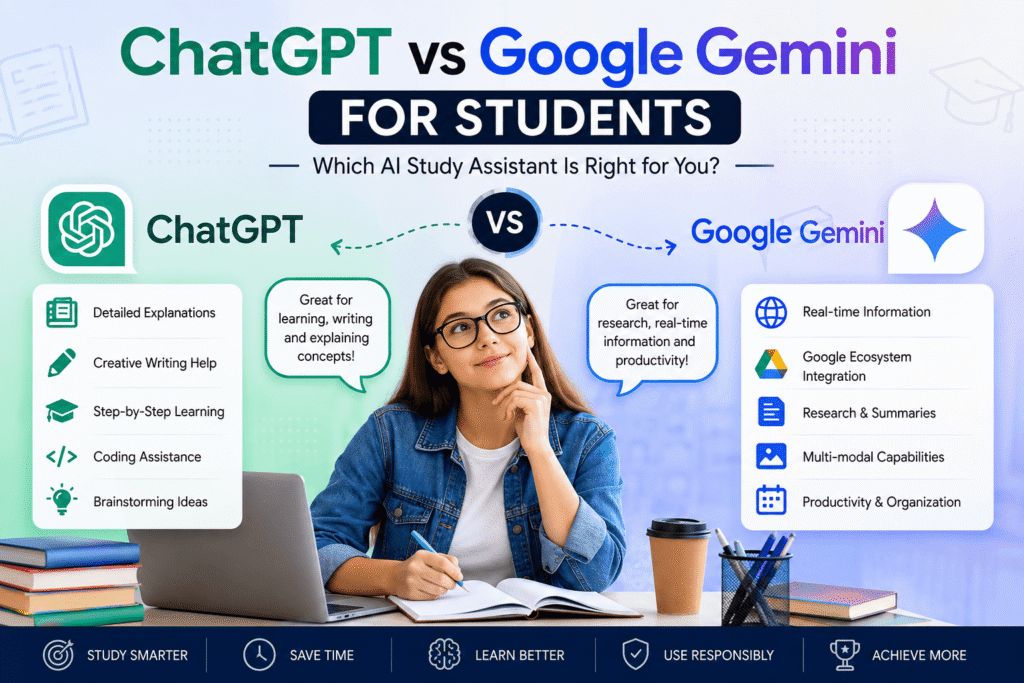
ChatGPT is known for detailed conversations, creative explanations, and writing support, while Google Gemini offers strong connections with Google services and information discovery capabilities.
The right choice depends on what students need most. Some learners may prefer personalized explanations, while others may benefit from research assistance and integration with their existing digital tools.
This guide explains the differences between ChatGPT vs Google Gemini for students, including features, benefits, limitations, practical uses, and tips for selecting the best AI study assistant.
Table of Contents
- Why AI Tools Matter for Students Today
- ChatGPT vs Google Gemini for Students: Key Differences
- How ChatGPT Helps Students Learn Better
- How Google Gemini Supports Student Learning
- Comparing AI Study Assistants: Strengths and Weaknesses
- Benefits of Using AI Tools for Education
- Best Practices for Students Using AI
- Common AI Mistakes Students Should Avoid
- Student AI Tool Checklist
- CTA: Improve Your Learning With AI
- Frequently Asked Questions
- Conclusion
Why AI Tools Matter for Students Today
Artificial intelligence is becoming a valuable learning companion for students around the world. Traditional education methods remain important, but AI tools provide additional support by offering instant explanations, personalized assistance, and faster access to information.
Students today face several challenges:
- Large amounts of study material
- Limited time for revision
- Complex academic concepts
- Pressure to improve writing and research skills
- Need for better productivity
AI assistants help address these challenges by acting as digital study partners.
For example, a student struggling with biology can ask an AI tool to explain a difficult concept using simple language. A university student writing a research paper can use AI to organize ideas and improve structure.
However, AI should not replace learning. The most effective students use AI tools to improve understanding, develop skills, and support independent thinking.
ChatGPT vs Google Gemini for Students: Key Differences
Both ChatGPT and Google Gemini are powerful AI platforms, but they are designed with different approaches.
Understanding their differences helps students choose the right tool based on their academic goals.
ChatGPT: A Flexible AI Learning Assistant
ChatGPT is widely used by students because of its conversational approach. It allows learners to ask questions naturally and receive detailed responses.
Students commonly use ChatGPT for:
- Explaining difficult lessons
- Creating study notes
- Improving essays
- Generating practice questions
- Learning programming
- Preparing presentations
- Brainstorming ideas
- One major advantage of ChatGPT is its ability to adjust explanations according to the student’s level.
A beginner can request a simple explanation, while an advanced learner can ask for deeper technical details.
Example:
A student studying economics might ask:
“Explain supply and demand in simple terms.”
After understanding the basics, the student can continue:
“Now explain it using real-world business examples.”
This interactive learning approach makes ChatGPT useful for different education levels.
How ChatGPT Helps Students Learn Better
1. Personalized Learning Support
Every student learns differently. Some prefer examples, others need step-by-step explanations.
ChatGPT allows students to customize learning by requesting:
- Beginner explanations
- Advanced summaries
- Real-life examples
- Practice exercises
- Quiz questions
This creates a more personalized learning experience.
2. Writing and Research Assistance
Writing assignments can be challenging, especially when students need to organize their thoughts clearly.
ChatGPT can assist with:
- Grammar improvement
- Essay structure
- Idea development
- Academic writing style
- Summarizing complex information
For example, a student preparing a history essay can ask for help creating an outline before starting the writing process.
Students should always review AI suggestions and ensure their final work reflects their own understanding.
3. Exam Preparation and Revision
Preparing for exams requires effective planning. AI tools can help students create structured revision strategies.
Students can use ChatGPT to generate:
- Flashcards
- Practice questions
- Revision schedules
- Topic summaries
For example, a medical student preparing for exams may request practice questions based on specific subjects.
How Google Gemini Supports Student Learning
Google Gemini is another powerful AI assistant that provides educational support through Google’s technology ecosystem.
Students who already use Google products may find Gemini convenient because it connects naturally with digital workflows.
1. Research and Information Organization
Many students use AI tools for research preparation. Gemini can help learners explore topics, summarize information, and organize ideas.
For example, a student researching renewable energy may use Gemini to identify important concepts before reviewing academic sources.
AI-generated information should always be verified using reliable references.
2. Google Ecosystem Integration
One advantage of Google Gemini is its connection with Google services.
Students who use tools such as:
- Google Docs
- Google Drive
- Google Workspace
may appreciate a smoother workflow.
This can help with organizing notes, managing documents, and improving productivity.
3. Multimodal Learning Features
Modern AI assistants can work with different information formats, including text and images.
Students may use AI tools to understand:
- Charts
- Diagrams
- Screenshots
- Visual learning materials
This can be especially useful for subjects like mathematics, science, engineering, and design.
Comparing AI Study Assistants: Strengths and Weaknesses
When comparing ChatGPT vs Google Gemini for students, there is no universal winner because every learner has different goals. The best AI assistant depends on whether a student needs help with writing, research, productivity, coding, brainstorming, or understanding difficult concepts.
Both platforms represent the growing role of artificial intelligence in education. Students should focus less on choosing a “perfect” tool and more on learning how to use AI responsibly.
ChatGPT Strengths for Students
ChatGPT has become popular among students because it provides interactive conversations and personalized explanations.
Students commonly use ChatGPT for:
- Understanding difficult subjects
- Creating study summaries
- Improving essays and assignments
- Generating practice questions
- Learning programming concepts
- Preparing presentations
- Brainstorming project ideas
One of ChatGPT’s biggest strengths is its ability to adjust explanations based on a learner’s level.
For example, a high school student studying chemistry can ask for a beginner-friendly explanation, while a university student can request a more technical breakdown with advanced examples.
Students interested in exploring official ChatGPT features can learn more about ChatGPT AI learning and productivity features from OpenAI’s official platform.
Google Gemini Strengths for Students
Google Gemini offers powerful AI capabilities designed to work within Google’s broader technology ecosystem.
For students who already use tools such as Google Docs, Google Drive, and other Google Workspace applications, Gemini can provide a convenient workflow for managing information and improving productivity.
Students may use Google Gemini for:
- Research assistance
- Summarizing information
- Organizing notes
- Exploring academic topics
- Supporting writing tasks
- Managing digital workflows
For official information about Gemini capabilities, students can explore Google Gemini AI features and capabilities.
Which AI Tool Is Better for Different Student Needs?
The answer depends on what the student wants to achieve.
Best AI Tool for Writing and Assignments
Students who need help improving essays, reports, and presentations may prefer ChatGPT because of its strong language understanding and conversational feedback.
It can help with:
- Creating outlines
- Improving sentence structure
- Explaining writing mistakes
- Developing ideas
However, students should always edit and personalize AI-assisted writing to maintain academic originality.
Best AI Tool for Research Support
Google Gemini can be useful for students who want help exploring topics and organizing research ideas.
For academic work, students should always verify information using trusted educational sources, research papers, and official publications.
Students can learn more about responsible AI use in education through resources from organizations such as:
Best AI Tool for Learning Difficult Concepts
Both ChatGPT and Google Gemini can explain complex topics, but students may prefer different learning styles.
ChatGPT can be helpful for:
- Step-by-step explanations
- Interactive discussions
- Personalized tutoring-style conversations
Gemini can be useful for:
- Exploring information
- Connecting ideas
- Working with digital resources
The best approach is to test both tools and choose the one that matches the student’s learning style.
Benefits of Using AI Tools for Education
Artificial intelligence is creating new opportunities for students by making learning more flexible and personalized.
1. Faster Understanding of Complex Topics
Students often struggle with difficult subjects because classroom explanations may not always match their learning style.
AI assistants can provide alternative explanations, examples, and simplified breakdowns.
For example:
A student struggling with calculus can ask an AI tool to explain a formula visually, provide examples, and create practice questions.
This type of personalized support helps students learn at their own pace.
2. Improved Productivity and Time Management
Students today manage multiple responsibilities, including:
- Classes
- Assignments
- Exams
- Research projects
- Part-time work
AI tools can help students create:
- Study schedules
- Revision plans
- Task lists
- Project outlines
Students who understand how to use AI productivity tools effectively can save time and focus more on meaningful learning.
3. Personalized Learning Experiences
Traditional education often follows a standard teaching method. AI allows students to customize their learning experience.
Students can request:
- Beginner explanations
- Advanced examples
- Practice exercises
- Quick summaries
- Detailed tutorials
This makes AI useful for different learning levels.
4. Developing Future Workplace Skills
AI literacy is becoming increasingly valuable in modern careers.
Students entering fields such as:
- Business
- Marketing
- Technology
- Healthcare
- Research
will likely benefit from understanding how to work effectively with AI tools.
Learning responsible AI usage today can help students prepare for future professional environments.
Best Practices for Students Using AI Tools
Using AI effectively requires good strategies. Students should treat AI as a learning assistant rather than a shortcut.
1. Create Better Prompts
The quality of AI responses depends heavily on the quality of instructions.
Instead of asking:
“Explain science.”
A better prompt would be:
“Explain photosynthesis for a beginner using a simple example and five key points.”
Clear prompts produce more useful answers.
2. Verify AI Information
Although AI tools are powerful, they can sometimes generate incorrect information.
Students should confirm important details using reliable sources such as:
- Academic journals
- University websites
- Government resources
- Educational organizations
For guidance about AI research and responsible technology development, students can explore Google AI research and education resources.
3. Maintain Academic Integrity
Students should follow their school or university policies when using AI.
AI can support:
- Learning
- Editing
- Brainstorming
- Research preparation
However, students should avoid submitting AI-generated work as their own.
4. Protect Personal Information
Students should avoid entering sensitive information into AI platforms.
Do not share:
- Passwords
- Private academic records
- Personal identification information
- Confidential documents
- Responsible AI usage protects privacy and security.
Common Mistakes Students Should Avoid
1. Depending Completely on AI
AI should support learning, not replace thinking.
Students who rely entirely on AI may miss opportunities to develop important skills.
2. Accepting Every Answer Without Checking
AI-generated responses should always be reviewed.
Students should ask:
- Is this information accurate?
- Does this match reliable sources?
- Can I explain this concept myself?
3. Using Weak Prompts
Short and unclear questions often produce general answers.
Students should provide:
- Background information
- Learning goals
- Desired explanation level
4. Ignoring School Guidelines
Educational institutions are developing their own AI policies.
Students should understand acceptable AI usage before using these tools for assignments.
Practical AI Tool Checklist for Students
Before choosing between ChatGPT and Google Gemini, students should consider:
 What type of help do I need? Do I need writing assistance, research support, or study planning? Which AI tool fits my current workflow? Am I checking important information? Am I improving my skills instead of avoiding learning? Does my school allow AI assistance for this activity?
Frequently Asked Questions (FAQ)
Is ChatGPT better than Google Gemini for students?
ChatGPT and Google Gemini both offer valuable features. ChatGPT is often preferred for explanations, writing assistance, and interactive learning, while Gemini can be useful for research and Google ecosystem integration.
ChatGPT and Google Gemini both offer valuable features. ChatGPT is often preferred for explanations, writing assistance, and interactive learning, while Gemini can be useful for research and Google ecosystem integration.
Yes. Students can use ChatGPT for explanations, revision planning, practice questions, brainstorming, and improving their understanding of difficult topics.
Is Google Gemini free for students?
Google Gemini availability and features may vary depending on region, account type, and Google’s current offerings. Students should check Google’s official Gemini information for the latest details.
Should students use AI tools for homework?
Students can use AI tools for learning support, brainstorming, and understanding concepts. However, they should follow school policies and avoid submitting AI-generated answers as original work.
What is the best AI study assistant?
The best AI study assistant depends on the student’s needs. ChatGPT may be ideal for interactive learning, while Google Gemini may suit students who prefer Google-based workflows.
Conclusion
The debate around ChatGPT vs Google Gemini for students shows how artificial intelligence is becoming an important part of modern education.
ChatGPT provides strong conversational learning, writing assistance, and personalized explanations. Google Gemini offers useful research support and integration with Google tools.
Instead of choosing based only on popularity, students should select the AI assistant that supports their learning goals. The most effective approach is to use AI responsibly, verify information, and continue developing independent thinking skills.
As AI technology continues evolving, students who learn how to use these tools effectively will be better prepared for future academic and professional opportunities.